



As an avid user of Microsoft software, there are a lot of shortcuts that can improve productivity and here I share a few that I use the most in my daily life.
Windows
- Alt+Tab / Alt+Shift+Tab: Change to other window/app. When you use, Windows will show all the windows/app you have open, continuing to click +tab will move you to the previously used ones, and +shift+tab will go the other direction. Bonus: you can reverse directions when the overview of all the windows is up, as long as you hold the alt key down (So just continue clicking tab or shift+tab multiple times)
- Windows+Arrow keys: Reshape the size of window that you are working with, very useful when using a big monitor to quickly align the windows.
- Windows+R: Open run window, typically I use to quickly open Notepad
- Windows+E: Open Windows Explorer
- Windows+L: Lock screen
Edge
- CTRL+Tab: Cycle to the tab on the right (if you are using horizontal tabs) or below (if you are using vertical tabs)
- CTRL+Shift+Tab: Cycle to the tab on the left (if you are using horizontal tabs) or above (if you are using vertical tabs)
Microsoft Office
Universal
- CTRL+C, CTRL+X, CTRL+V: Copy, Cut and Paste
- CTRL+S: Save
- CTRL+B, CTRL+I, CTRL+U: Bold, Italic, Underline
- CTRL+Z, CTRL+Y: Undo and Redo
- CTRL+A: Select all
- Start writing with “- ” or “1. “ and automatically create unnumbered or numbered list
- Double left click on a word: select the whole word
- Right click+Paste as values: paste just the values, without formatting. Makes a lot of pasting much faster
Powerpoint
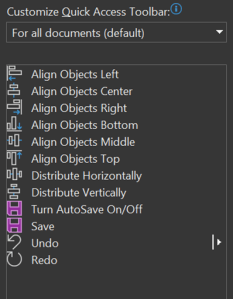
ALT+(Numbers): Set quick access toolbar with what you need. See on the right for my personal favorites to make quick and clean slides. This would mean that:
- ALT+1: Align objects left
- ALT+2: Align objects center
- ALT+3: Align objects right
- ALT+4: Align objects bottom
- ALT+5: Align objects middle
- ALT+6: Align objects top
- ALT+7: Distribute horizontally
- ALT+8: Distribute vertically
Excel
- CTRL+Arrow keys: move to the next cell with value or to edge of table/file
- Format as table: Set a designated area as table object
Teams
- CTRL+Shift+V: Paste as values. Teams can be super slow on pasting anything to the chat, so pasting as values will make it so much more faster
- CTRL+Spacebar: Temporary unmute in calls
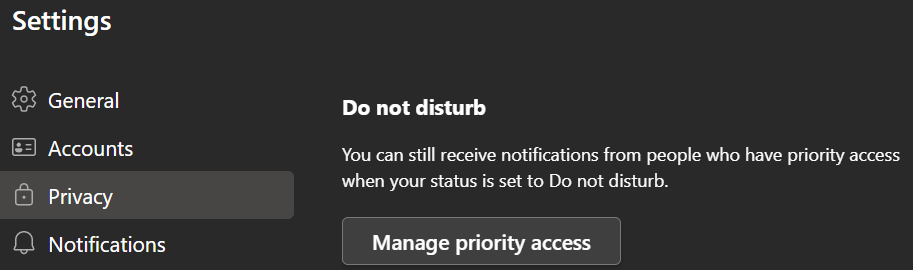
- Privacy>Do not Disturb>Manage Priority Access: Not all your coworkers are equal, pick who can bypass your DnD status
 Chris' Learning Notes